Infrastructure behind this site
Introduction
I'm not primarily a frontend developer, so this website isn't the most impressive. Its purpose is to serve as a personal CV and a space to document my personal DevOps projects. The site is created using Docusaurus, which allows ease of use to document projects and future endeavors using markdown.
What is perhaps more interesting is the site's hosting and CI/CD pipeline setup, though admittedly overkill for a static site. This was a practice project and a showcase of my skills. This document will explore this setup in detail.
The setup includes an always free Kubernetes cluster using Oracle Cloud, Containerization of the website, CI/CD using GitHub Actions, CD using ArgoCD and Helm, public traffic through the Kubernetes Gateway API and private admin access over Tailscale. So keep reading if you are interested.
The webpage
The site's code is stored in this Github repository, it is created using Docusaurus, a React-based static-site generator for fast, interactive sites, ideal for documentation, blogs, or personal projects.
The build output is plain static files, served by an Nginx container with a small configuration for compression, cache headers and the 404 page.
The Kubernetes cluster
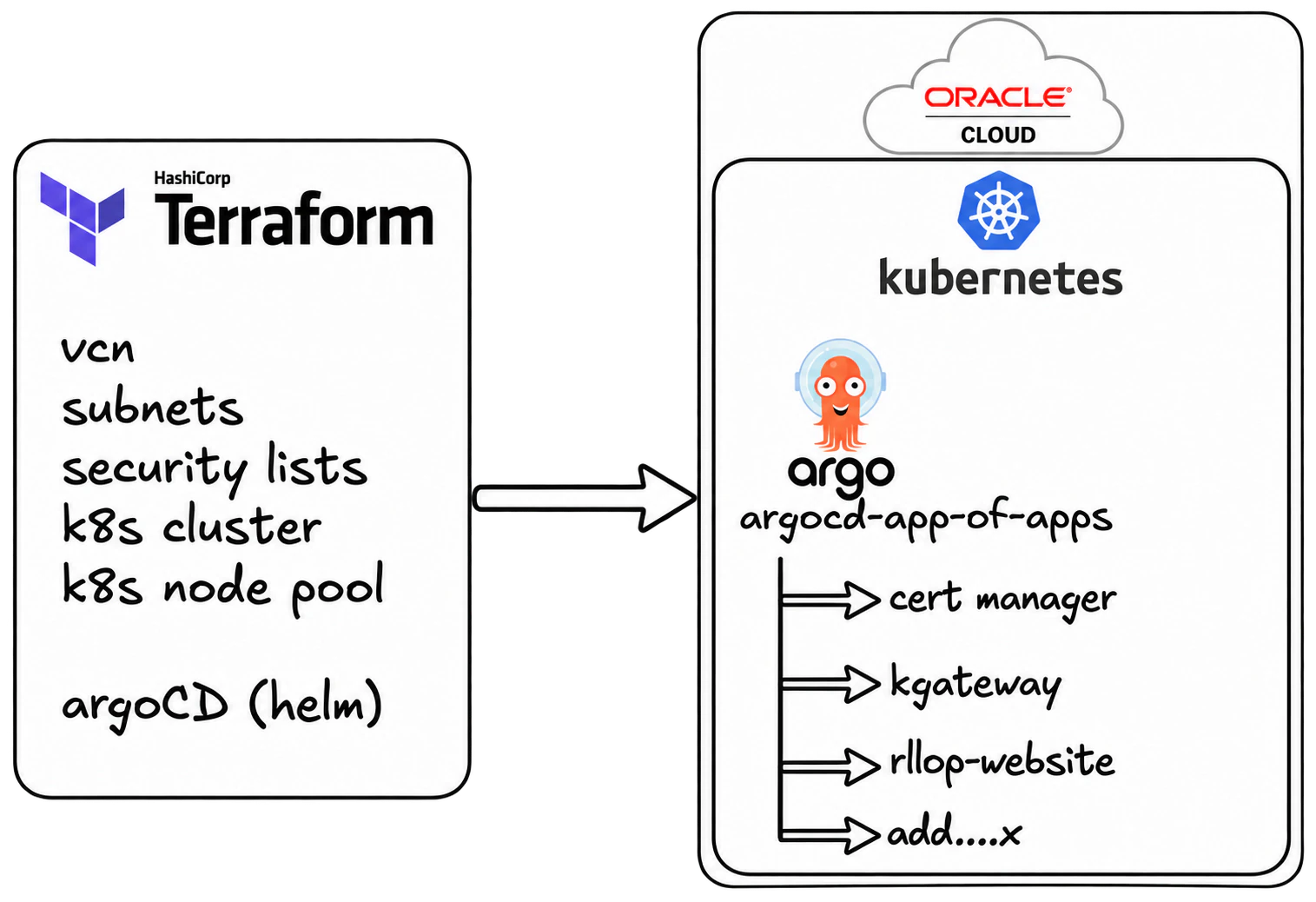
The Kubernetes cluster is hosted on Oracle Cloud, and it is declared using Terraform, the code is public in this Github repository.
The Terraform code is declaring all the necessary infrastructure resources on Oracle Cloud. (Only using always free resources). It is creating:
- 1 VCN
- 2 subnets (1 public, 1 private)
- 1 OKE (Oracle) Kubernetes cluster
- 1 Node pool for the cluster. Formed by 2 instances of VM.Standard.A1.Flex 2 OCPUs and 12 GB each, making use of the limit Always free compute of Oracle Cloud.
It also has a 2nd part to deploy ArgoCD using Terraform. ArgoCD along with the app of apps pattern are then used to deploy the rest of needed resources to the Kubernetes cluster. The same Terraform code creates the secret that the Tailscale operator needs (more on that below).
The README.md has much more detailed information on how to set it up if you want to replicate this.
Helm charts & App of Apps
Once the Kubernetes cluster is set, and ArgoCD is deployed using Terraform. Using ArgoCD and GitOps (app of apps pattern) we can deploy anything else that is desired to the Kubernetes cluster.
The app of apps Github repository is a Helm chart whose values are the list of ArgoCD Applications. Each Application points to one of the charts stored in the Helm charts Github repository. Right now these are the Applications:
- cert-manager and a Let's Encrypt
ClusterIssuer, for the TLS certificates. - Gateway API CRDs, taken directly from the upstream gateway-api repository.
- kgateway, the Gateway API implementation (based on Envoy), together with the public
Gateway. - Tailscale operator, for private access to the cluster.
- This site, an Nginx deployment with its own route and certificate.
All of them sync automatically, with prune and self-heal, so the Git repositories are the only way anything changes in the cluster. More apps can simply be added to the values.yaml of the app of apps, and Argo will automatically sync and deploy any new app.
Public traffic: Gateway API
The site used to be exposed with ingress-nginx. It now uses the Kubernetes Gateway API, the successor of the Ingress API, with kgateway as the implementation. This is how a request reaches the site:
- The DNS records of
ricardllop.compoint to a reserved public IP in Oracle Cloud. - That IP belongs to an Oracle Cloud Network Load Balancer, created automatically for the
LoadBalancerService that kgateway generates from theGatewayresource. - The Envoy proxy of kgateway terminates TLS and matches the request against the
HTTPRouteof the site. - The route sends it to the Service of the Nginx deployment that serves the static files.
There is one shared Gateway for the whole cluster, defined in the kgateway chart, and it only has a plain http listener. Everything that belongs to a hostname lives in the chart of the workload that owns it. The chart of this site contains:
- A
ListenerSetthat adds onehttpslistener per hostname to the shared Gateway. - The cert-manager
Certificatefor those hostnames. - The
HTTPRouteattached to thatListenerSet. - A second
HTTPRoutethat redirects http to https.
This way a new workload brings its own hostnames and certificate without touching the Gateway.
The certificates are issued by Let's Encrypt through cert-manager using the HTTP-01 challenge, which cert-manager solves by creating a temporary HTTPRoute on the http listener of the Gateway.
Private access: Tailscale
ArgoCD has no public route. Its server is exposed only inside my Tailscale network through the Tailscale Kubernetes operator, so the ArgoCD UI is reachable from my own devices and from nowhere else. The operator also runs a Connector that advertises the pod network as a subnet route and can be used as an exit node.
Setting up the CI for the site
To achieve easy continuous integration for the site, and being able to automatically generate new container versions with any commit I push to GitHub, I used GitHub Actions.
The configuration is done in the code repository itself. In the file: .github/workflows/build-deploy-docker.yml .
You can see this Github workflow will actually do both CI and CD (along with ArgoCD). I will explain the CI here and the CD on the section below.
This GitHub Action workflow builds and pushes a Docker image to Docker Hub when changes are pushed to the main branch.
- Logs in to Docker Hub using credentials stored in Github secrets
- Installs and configures QEMU, enabling cross-platform builds.
- Configures Docker Buildx, a CLI tool for advanced Docker image building features.
- Creates a unique tag for the Docker image using the current date and time in the format
ga-YYYY.MM.DD-HHMM - Builds the Docker image for the
linux/arm64platform. Pushes the built image to Docker Hub. Tags the image using the timestamp tag generated in the previous step
The site itself is built in a Node stage that runs on the architecture of the GitHub runner, without emulation. Only the final Nginx image, which just copies the static files, is linux/arm64.
With these steps, we have the CI configuration completed, and any commit to the main branch will trigger a new Docker image tag build that we could (if desired) deploy manually to the cluster. But we have gone further and set up a CD part.
Setting up the CD for the site
To achieve easy continuous deployment, apart from having ArgoCD on autosync configuration, there is an additional part on the GitHub Action workflow that is triggered on push to the main branch. Therefore, on each build and push to the Docker registry, the following actions will also execute:
- Checks out the
rllopsite-chartdirectory of the Helm charts repository. - Uses yq, a command-line YAML processor, to update the image tag in the
rllopsite-chart/values.yamlfile with the new Docker image tag. - Configures Git with a default username and email for committing changes.
- Commits the updated
values.yamlfile (with the new image tag) to the repository. - Pushes the commit to the
mainbranch.
Then ArgoCD will detect those changes on its periodic refresh and will sync (as autosync is activated), deploying the newly built container to the cluster.
Conclusions
This project demonstrates a robust, full-stack DevOps pipeline, showcasing skills in infrastructure automation, containerization, CI/CD, and GitOps. The use of Oracle Cloud’s free-tier Kubernetes cluster, Terraform for infrastructure provisioning, and ArgoCD for managing deployments with the app-of-apps pattern provides a solid foundation for scaling applications.
The CI/CD pipeline, powered by GitHub Actions, automates the build and deployment of the website, with updates quickly reflected in the live environment through ArgoCD's autosync feature.
In conclusion, this setup might be overkill for a static website, but it serves as a perfect practice project to showcase my knowledge with modern DevOps tools and methodologies. The flexibility and scalability of the architecture ensure that the system can easily accommodate future enhancements, making it a valuable foundation for future projects and experiments.